
Video call glare: stopping your glasses reflecting the screen
Your glasses reflect whatever is in front of them, which on a video call is a bright rectangle of screen. Free fixes: tilt the frame down slightly, raise the camera above eye level, and move your light source off to one side. The permanent fix is a multi-layer anti-reflective coating on the lens.
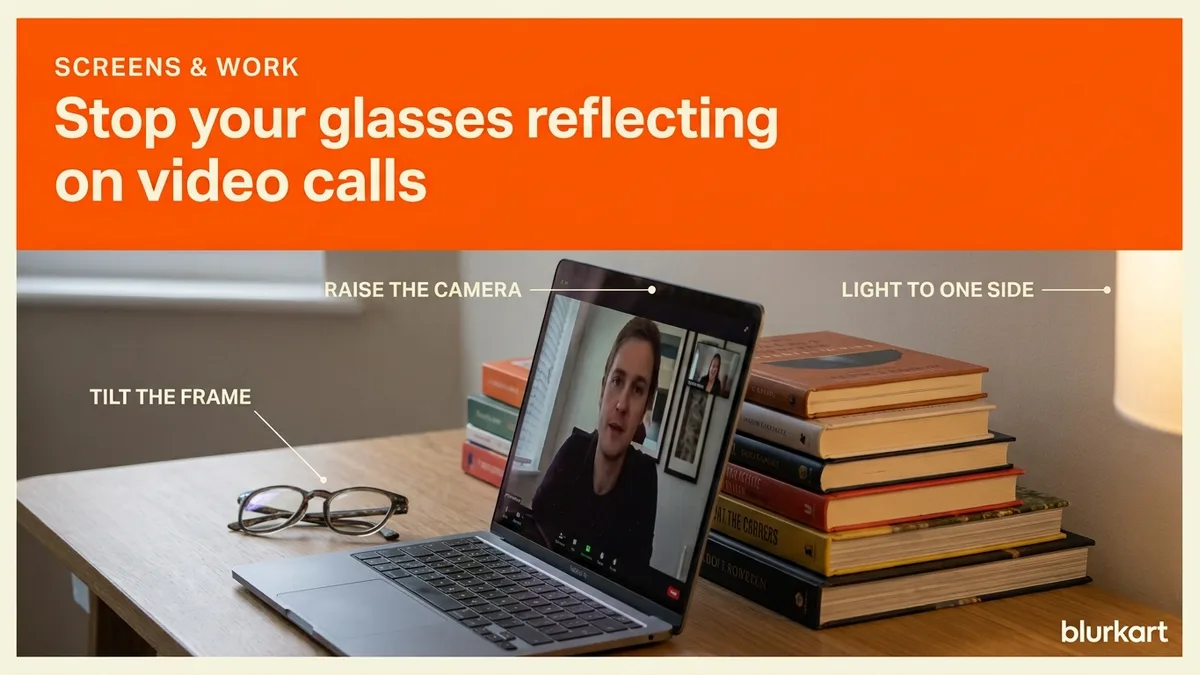
Video call glare is the two white rectangles where your eyes should be. It is not a camera problem and not a fault in your glasses. A lens is a curved piece of glass or plastic, and it reflects whatever bright thing is in front of it, which on a call is your own screen.
Fixing video call glare for free
Tilt the frame. Push the arms slightly up behind your ears so the fronts angle a few degrees downward. That redirects the reflection below the camera line instead of straight into it. This is the single most effective free adjustment and takes a second.
If your frame will not hold the angle, we will set the pantoscopic tilt properly at either showroom. It is free, on any frame, and what an optician adjusts explains what that actually means.
Raise the camera. Put the laptop on a couple of books so the camera sits slightly above eye level and you look up a touch. The reflection then travels downward, away from the lens. This also happens to be a more flattering camera angle.
Move the light off-axis. The biggest single cause is a light source directly behind or beside the camera, which is exactly where people put ring lights. A ring light behind a webcam is the worst possible arrangement for anyone wearing glasses, because it is a bright circle aimed straight at two curved mirrors.
Move the light 45 degrees to one side and slightly above. You still get lit, and the reflection goes off to the side rather than into the lens.
Check what is behind you too. A window behind your monitor reflects off the back surface of your lenses and into your eyes, which is a comfort problem as well as a camera one.
The permanent fix
A multi-layer anti-reflective coating on the lens. It cancels most of the reflection at the surface, so instead of an opaque white rectangle you get a faint ghost, and often nothing visible at all once your light is off-axis.
This is the same coating that stops headlights smearing at night and reduces eye strain on long screen days, so it is not a single-purpose purchase. At Blurkart a basic blue coat lens is NPR 750 and the multi-coated version with a proper anti-reflective stack is NPR 1,800. That difference is the fix. Lens coatings explained covers what each layer does.
One caveat worth being honest about: coatings cannot be added to lenses you already own. They are applied during manufacture, so it means new lenses. If your current ones are scratched anyway, new lenses in your old frame costs the lens price only.
What not to do
Do not take your glasses off for the whole call unless you genuinely see well without them. An hour of squinting at a screen to look better on camera is a bad trade, and you will feel it by evening.
Do not buy a cheap tinted lens sold as a screen solution. A tint darkens, it does not stop surface reflection, and the two are unrelated.
Worth a check
If the glare bothers you enough to research it, your setup is probably also giving you eye strain you have stopped noticing. Screen at arm's length, top of the screen at or just below eye level, brightness matched to the room, and a break every twenty minutes.
Desk setup covers it, and screen protectors or glasses covers the other half of the glare question. The eye test is free at both showrooms and screen glasses start at NPR 999.
A thirty second setup check
Open your camera app before the call rather than discovering the problem on it. Look at your own preview and adjust in this order: tilt the frame, raise the laptop, move the light.
Check the background too. A window behind you produces a silhouette and an autofocus that hunts, and both get blamed on the camera.
If you present or record often, this is worth solving permanently rather than each time. An anti-reflective coating on your next pair of lenses handles it without any setup at all, and it happens to be the same upgrade that helps with night driving and long screen days, so it is rarely a single-purpose spend.
Frequently asked
- Will anti-reflective coating remove it completely?
- Not completely, but it cuts the reflection substantially, typically from an opaque white rectangle to a faint ghost. Combined with moving your light off-axis it usually stops being noticeable.
- Should I just take my glasses off for calls?
- Only if you can see the screen comfortably without them. Squinting through an hour-long call to look better on camera trades a real problem for a cosmetic one.
- Video call ma chasma ma batti pratibimba hunchha, k garne?
- Chasma lai ali tala jhukaunus, camera lai aankha bhanda mathi rakhnus, ra batti lai sidha agadi hoina, chheu ma rakhnus. Sthayi samadhan chai anti-reflective coating bhayeko lens ho, NPR 1,800 dekhi.