
Desk setup for eye strain: six fixes that cost nothing
Put the monitor an arm's length away, about 60 cm, with its top edge at eye level. Keep windows to the side, not behind or in front of the screen. Match screen brightness to the room. Blink on purpose and look 20 feet away for 20 seconds every 20 minutes.
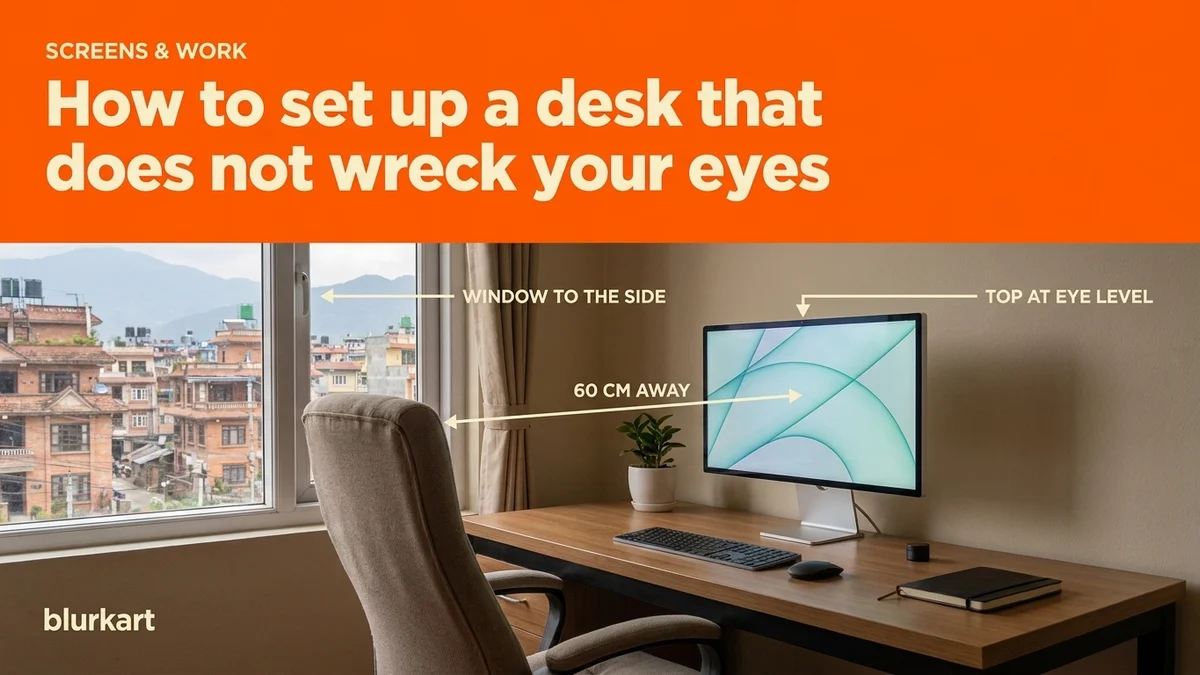
The desk setup that protects your eyes is simple, and it works the same in a Baluwatar flat or a co-working space in Jhamsikhel: monitor an arm's length away with its top edge at eye level, windows to the side, screen brightness matched to the room, and a short look into the distance every 20 minutes. Most afternoon eye aches in the home offices we hear about come from getting two or three of those wrong, and none of the fixes cost money.
Distance: 60 to 70 cm
Sit back, extend your arm, and your fingertips should just touch the screen. That is roughly 60 to 70 cm. Closer than 50 cm makes the focusing muscle work all day. Further than 80 cm makes you lean in and squint at small text. If the text is too small at arm's length, make the text bigger, not the distance smaller.
Laptops break this rule by design. The screen sits too close and too low. A laptop stand with a separate keyboard is the single best purchase for anyone who works on one all day.
Height: top edge at eye level
Your eyes should rest slightly downward to hit the centre of the screen. Looking up dries the eyes because the lids open wider. Looking far down cramps the neck. Stack the monitor on books until the top edge lines up with your eyes when you sit straight.
Light: windows to the side
Kathmandu has strong winter sun through most of the day. A window behind the screen makes you stare into brightness; a window behind you reflects off the screen. Put the window to your side. If you cannot move the desk, a thin curtain during the brightest hours does most of the work.
Desk lamps: put the lamp behind or beside the monitor, pointed at the wall or the keyboard, never at the screen. A lamp that lights the screen from the front paints a reflection on it that your eyes fight all evening.
Brightness: paper, not a torch
Hold a sheet of white paper next to the screen. The screen should look about as bright as the paper. If it glows, turn it down. If it looks grey, turn it up. Most screens ship far too bright for a normal room. In the evening, drop it again.
Blink, and look away
People blink around 15 times a minute normally and about 7 at a screen. That is why eyes sting by 5 pm. The dryness is worse from November to March when Valley humidity drops. Two habits fix most of it:
- Every 20 minutes, look at something about 20 feet away for 20 seconds. Set a phone timer for the first week until it becomes automatic.
- Blink fully, on purpose, a few times whenever you notice the sting. It sounds silly and it works.
When the desk setup is right and it still hurts
Then it is time to check the eyes rather than the desk. Small uncorrected powers, especially astigmatism, cause exactly this kind of screen fatigue, and a lot of people find out at 35 that they have needed a mild lens for years. The test is free at both Lalitpur showrooms.
If you already wear glasses, an anti-reflective coating cuts the reflections you do not notice you are looking through; the multi-coated lens at NPR 1,800 is the one we fit for desk workers, usually in a light frame like the Premium Rectangle Frame with blue light protection at NPR 1,500. We are honest about the blue-filter part of the story in our post on whether blue light glasses actually work. Over 40, an office lens that covers screen and desk distance is often better than a full progressive.
A desk setup checklist for Nepal's home offices
Things that are specific to working from home here, learned from customers who do it.
- Inverter light is dim and yellow. When the power drops to backup, screens look far brighter than the room. Drop screen brightness with it, or work on the laptop at a lower level until mains returns.
- Winter mornings are dark until 7 and bright by 10. A desk that faced a window comfortably in August is a glare problem in December. Move it once a year, or hang a thin curtain.
- Ceiling fans in summer dry eyes fast. Point the fan away from the face, not at it.
- Dust on the screen scatters light and lowers contrast. Wipe it weekly; you will turn the brightness down afterwards without noticing.
Computer chasma helps some people, and we say so honestly in the shop. But the cheapest and most effective fix is still the sixty centimetres between your eyes and the screen.
Fix the desk first. It costs nothing and it solves more than half the cases we see. The medical name for the whole cluster, and the rest of the fixes, is in computer vision syndrome is real, and mostly fixable.
Frequently asked
- Is a laptop worse than a monitor?
- Usually, because the screen sits low and close. A laptop stand and an external keyboard fix both problems for under NPR 3,000.
- Do I need computer glasses if my desk is set up well?
- Many people do not. If you are over 40 or already wear glasses, an office lens or an anti-reflective coating helps. Our post on blue light glasses covers what they do and do not do.
- Does dark mode help?
- In a dark room, yes. In a bright room, a dark screen forces your pupils to fight the room. Match the screen to the surroundings.
- Why do my eyes sting by evening?
- Dryness. You blink half as often while reading a screen. A conscious blink every few minutes and a humidifier in the dry months from November to March make a real difference.
- Computer ma kaam garda aankha dukhchha, ke garne?
- Move the screen to arm's length, put the top edge at eye level, keep windows to the side, and look 20 feet away for 20 seconds every 20 minutes. If it still hurts after a week, get a free eye test; a small uncorrected power is a common cause.